

AI is everywhere in small business conversations—often framed as a fast path to “doing more with less.” But a smoother workflow isn’t the same thing as more revenue. Many owners invest in AI tools, see activity increase (more posts, more emails, more reports), and assume growth is happening. This week’s goal: separate efficiency theater from profit impact, and learn how to evaluate AI tools based on measurable outcomes that actually move your business forward.
Table of Contents
- AI revenue vs. AI efficiency: what’s the real difference?
- Spotting “efficiency theater” (and why it’s so common)
- Where AI can genuinely increase revenue (with practical examples)
- A simple evaluation framework: tie every tool to a business lever
- Tool comparison table: efficiency tools vs. revenue tools
- Measurement playbook: how to prove ROI in 30 days
- A practical workflow: “AI revenue loop” for small teams
- What to do this week: a realistic implementation plan
- Conclusion: choose AI that pays you back
AI revenue vs. AI efficiency: what’s the real difference?
AI can help your business in two broad ways:
- Workflow efficiency: reducing time, effort, and errors (e.g., drafting emails faster, summarizing meetings, organizing notes, automating data entry).
- Revenue impact: increasing sales, improving conversion rates, raising average order value, improving retention, or increasing lead flow quality.
Both matter. The problem is that efficiency is easier to feel than revenue is to prove. You notice when a task takes 12 minutes instead of 45. But revenue outcomes often lag, require better tracking, and depend on your offer, pricing, and sales process.
Here’s the key distinction small businesses should adopt: Efficiency is a cost story; revenue is a growth story. AI that saves time can be valuable—but only if you convert that saved time into something that increases profit (more sales calls, better follow-up, faster delivery, upsells, reduced churn).
“Productivity gains don’t automatically translate into profits. The payoff comes when businesses redesign workflows and decisions around the technology—not when they simply add tools on top of old habits.”
Spotting “efficiency theater” (and why it’s so common)
Efficiency theater happens when AI makes you feel busy and modern without changing the outcomes that matter. It’s common because many AI tools are designed to produce immediate visible output: content drafts, summaries, chat responses, “smart” dashboards, automated tasks.
Common signs you’re experiencing efficiency theater:
- You’re producing more (posts, emails, proposals), but pipeline quality or close rate hasn’t improved.
- Your team is impressed by speed, but customers aren’t noticing any difference.
- AI outputs aren’t connected to a KPI (key performance indicator). They’re “nice,” not necessary.
- You added tools without subtracting steps. Your process got more complicated, not simpler.
- ROI is described in time saved but not converted into dollars or capacity for revenue-producing work.
A practical way to test for efficiency theater: ask, “If we turned this tool off next month, would revenue drop?” If the honest answer is “probably not,” then you’re looking at convenience—not growth.
Where AI can genuinely increase revenue (with practical examples)
AI is most likely to increase revenue when it influences one of these levers:
1) Lead conversion: responding faster and following up better
For many small businesses, the biggest hidden revenue leak is slow response time and inconsistent follow-up. AI can help by:
- Drafting response templates for inquiries that still sound human (and on-brand).
- Routing leads to the right person, offer, or appointment type.
- Triggering follow-up sequences when someone requests a quote or abandons a booking.
Revenue outcome to measure: increased inquiry-to-appointment rate, increased quote-to-close rate, reduced time-to-first-response.
2) Sales enablement: better proposals, clearer positioning, fewer stalled deals
AI can help sales conversations become more consistent and persuasive by:
- Turning discovery notes into structured proposals and scopes of work.
- Generating “objection handling” talking points for your specific niche.
- Creating tailored case study snippets based on customer segment.
Revenue outcome to measure: shorter sales cycle, higher close rate, higher average deal size.
3) Customer retention: keeping customers longer and reducing churn
Retention is often the fastest path to revenue growth because you don’t need to pay to acquire the customer again. AI can support retention by:
- Flagging customers showing “risk signals” (missed invoices, reduced usage, fewer reorders).
- Generating outreach scripts for check-ins that feel personal, not automated.
- Helping you build a lightweight customer education system (FAQs, onboarding guides, troubleshooting).
Revenue outcome to measure: churn rate, repeat purchase rate, subscription renewals, lifetime value.
4) Pricing and margin: improving what you keep, not just what you sell
AI can support margin improvements by:
- Analyzing service delivery time vs. pricing to identify underpriced packages.
- Helping standardize scopes to reduce “free work creep.”
- Identifying which product/service combos create the best profit per hour.
Revenue outcome to measure: gross margin, profit per job, effective hourly rate, discount frequency.
5) Upsells and cross-sells: recommending the right next step
Even simple AI rules can increase average order value when tied to customer behavior:
- Post-purchase follow-ups offering the next logical add-on.
- Service reminders and renewal prompts.
- Segmented offers based on customer type or previous purchases.
Revenue outcome to measure: average order value (AOV), upsell conversion rate, revenue per customer.
A simple evaluation framework: tie every tool to a business lever
Before you buy or deploy an AI tool, run it through this quick framework. You can do it in 10 minutes, and it prevents most “AI spending regret.”
Step 1: Identify the business lever
Choose one primary lever the tool is expected to move:
- More leads
- Higher conversion
- Higher average order value
- Higher retention
- Higher margin
- Lower delivery cost (time, errors, rework)
Step 2: Define the KPI and baseline
Write down today’s number. Not an estimate—your best actual baseline from the last 30–90 days.
- Example: “We respond to leads in 14 hours on average.”
- Example: “We close 18% of quotes.”
- Example: “We lose 6 customers/month.”
Step 3: Decide what success looks like in dollars
Time savings can be real, but translate them into business impact:
- “If we save 5 hours/week, we will use that time to do 10 additional follow-ups, which should create 2 more booked calls/month.”
- “If we reduce rework by 20%, we can complete 2 more jobs/month without hiring.”
Step 4: Check integration and adoption reality
The best AI tool is useless if it lives in a separate tab nobody uses. Ask:
- Does it connect to our CRM, inbox, calendar, POS, accounting, or help desk?
- Will staff use it inside existing workflows?
- Does it require constant prompting or babysitting?
Step 5: Run a contained pilot
Pick one workflow, one team member (or one location), and one KPI. Pilot for 2–4 weeks and decide with data—not hype.
Tool comparison table: efficiency tools vs. revenue tools
Many tools can do both, but they usually lean one direction depending on how you implement them. Use this table to classify what you’re buying and what you must measure.
| AI Use Case | Typical “Quick Win” | Real KPI to Track | Revenue Link (How It Pays) | Pilot Test Idea (2–4 Weeks) |
|---|---|---|---|---|
| AI email drafting for inquiries | Faster replies | Time-to-first-response; inquiry-to-appointment rate | More leads convert before they go cold | Use AI drafts for 50% of new leads; compare booking rate |
| Chatbot / AI web chat | 24/7 coverage | Qualified lead rate; booked calls; lead-to-close rate | Captures demand outside business hours | Route chatbot leads into CRM with a “source” tag; track close rate |
| Meeting summaries and action items | Less note-taking | On-time task completion; fewer missed follow-ups | Prevents revenue leaks from dropped balls | Run for sales calls only; track follow-up sent within 24 hours |
| AI-assisted proposals / quotes | Faster proposal creation | Quote-to-close rate; sales cycle length | Improves clarity, consistency, and speed | Standardize 1 offer template; compare close rate to last month |
| AI content generation (blogs/social) | More posts | Traffic to lead conversion; cost per lead; lead quality | Only pays if it increases qualified demand | Publish 4 AI-assisted posts tied to one offer; track form fills |
| AI support desk responses | Faster customer replies | Ticket resolution time; CSAT; churn | Retention and reduced support cost | Use AI drafts for top 20 issues; measure reopen rate |
Measurement playbook: how to prove ROI in 30 days
If you want AI to drive measurable outcomes, you need lightweight measurement—not a complicated analytics rebuild. Use this 30-day playbook.
Week 1: Choose one revenue-adjacent workflow
Good starting points:
- Lead response and follow-up
- Quote creation and delivery
- Renewal reminders and retention outreach
- Scheduling and no-show reduction
Pick the workflow that’s closest to cash collection. Content can work, but it’s slower and harder to attribute.
Week 1: Establish a baseline
- How many leads came in?
- How many booked?
- How many closed?
- What was the average sale?
- How long did it take to respond?
If you don’t have a CRM, a spreadsheet is fine for a month. The key is consistency.
Weeks 2–3: Implement AI with a “single owner”
Assign one person to run the pilot and keep it consistent. AI projects fail when “everyone tries it” but no one owns the outcome.
- Document the new process in 6–10 bullet points.
- Create templates and prompts once, then reuse them.
- Set a quality standard (for example: “No messages sent without a human review.”)
Week 4: Review results like an operator
At the end of the month, you should be able to answer:
- Did the KPI move?
- Did revenue change, or did we only get faster?
- What broke (handoffs, approvals, data issues)?
- What would we remove or simplify?
If revenue didn’t move, don’t automatically abandon the tool. Instead ask: Did we connect the time savings to revenue-producing activity? If not, that’s the missing step.
A practical workflow: “AI revenue loop” for small teams
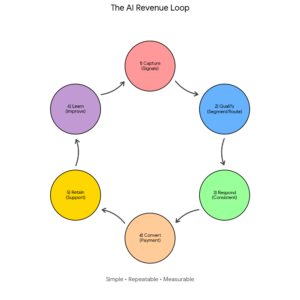
Figure: The AI Revenue Loop (simple, repeatable, measurable)
This loop matters because it forces AI into the places where money is made or kept. Many businesses start with “Create content faster.” The revenue loop starts with “Convert leads faster” or “Keep customers longer.” That’s usually where ROI shows up first.
What to do this week: a realistic implementation plan
If you want AI to create measurable business outcomes, take these steps over the next 5 business days.
Day 1: Pick one metric that impacts cash
- Time-to-first-response
- Booked call rate
- Quote-to-close rate
- No-show rate
- Repeat purchase rate
Choose one. More than one metric at the start increases confusion and weakens adoption.
Day 2: Map the workflow in plain language
Write the steps as they really happen today. Example:
- Lead submits form
- Inbox notification arrives
- Someone replies “when they get a chance”
- Customer asks two more questions
- We send a calendar link
- They go cold
This is where you’ll find the actual revenue leaks.
Day 3: Add AI only where it reduces delay or improves consistency
Great “first AI” upgrades:
- AI-drafted replies for common inquiries (pricing range, next steps, availability)
- AI-generated call recap + follow-up email sent within 2 hours
- AI-assisted proposal template that enforces consistent scope and pricing language
Day 4: Add one automation that removes a handoff
Automation is often what turns AI output into ROI. Examples:
- When a lead comes in, create a CRM record, tag the source, and assign an owner.
- When a quote is sent, schedule a follow-up task in 2 business days.
- When an appointment is booked, send reminders and a pre-qualification form.
Day 5: Set a 15-minute weekly review
Put it on the calendar. Review:
- What happened to the KPI?
- Where did the process still slow down?
- What template or prompt needs improvement?
This weekly review is where “AI as a tool” becomes “AI as a system.”
Conclusion: choose AI that pays you back
AI can absolutely make your business feel smoother—fewer manual tasks, faster writing, cleaner documentation. But real growth happens when AI is tied to a measurable business lever: converting more leads, keeping more customers, increasing average order value, protecting margin, and reducing costly mistakes. This week, pick one workflow near revenue, set a baseline, run a short pilot, and measure the result. Your goal isn’t to look more productive—it’s to earn more.
Need help turning AI into measurable revenue and time savings? A.I. Solutions can help you select the right tools, design workflows that staff will actually use, and set up tracking that proves ROI. Contact A.I. Solutions here.