
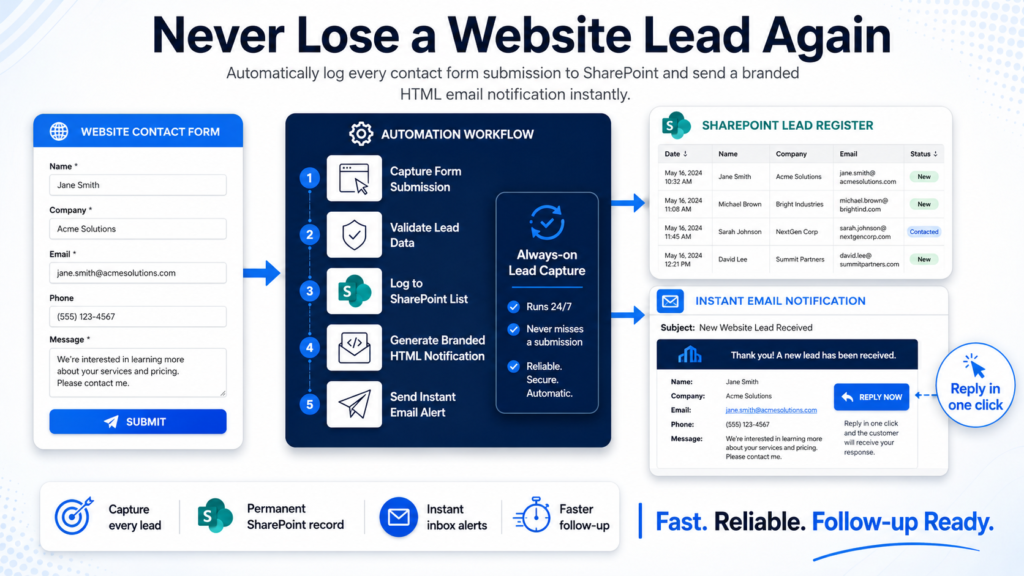
Turn contact form submissions into organized records and instant email alerts with n8n, saving time and keeping your team on top of every lead without extra effort.
Streamline Contact Form Submissions with SharePoint & Outlook
Automatically organize WordPress contact form submissions in SharePoint and receive instant alerts in Outlook. Simplify team collaboration and never miss an important inquiry.
What it does
-
SharePoint Integration:
Instantly sends new contact form entries to a SharePoint list for dynamic record-keeping. -
Outlook Email Notification:
Notifies the team with formatted email alerts when a new submission is received. -
Form Data Sanitization:
Ensures only clean, relevant data gets forwarded, minimizing clutter and errors.
What’s Included
- Sanitized workflow JSON
- PDF user guide
- Starter asset files
Requirements
- SharePoint account with access to create/edit lists
- Microsoft Outlook account
- WordPress website with contact form plugin (e.g., Contact Form 7, WPForms, Gravity Forms)
- n8n instance (self-hosted or cloud)
Ready to automate your contact form workflows?
Have questions or need help? Contact support@ais.email — we’re here for you.
What you get
- The complete n8n workflow (
.json) — import-ready, with a full setup guide in the workflow's sticky notes - Written documentation (
DESCRIPTION.md) - Extra:
contact_form-1.zip - README with import instructions and license
Delivered as a ZIP (8 KB) · SHA-256 0099edb3359affb2…
Also listed in the n8n community library.
Requirements
- A working n8n instance (n8n Cloud or self-hosted)
- Credentials for the services the workflow connects to (listed in the setup sticky note inside the workflow)
How delivery works
Checkout is handled securely by Stripe — we never see your card details. The moment your payment completes, your download is available on the confirmation page, and a backup link is emailed to you. Links stay valid for 72 hours and up to 5 downloads; if yours expires, we'll re-issue it free — see support below.
Support
Every workflow includes email support for installation and setup questions: support@ais.email. We typically reply within one business day.
Lost or expired download link? Get a fresh one here — no need to email us.
Need this workflow customized for your business, or want it installed and configured for you? That's what we do — ask about our implementation services.
Get Process Contact Form Submissions
One-time purchase · instant download · free link re-issue
Buy Now — $5.00