
Who is this for
This template is built for small business owners, content marketers, and agencies who publish regularly to a WordPress blog and want to automatically surface that content as a polished weekly email digest — without manual curation or copywriting. If you have a WordPress site, an OpenAI API key, and a Gmail account, you can have this running in under 30 minutes.
What it does
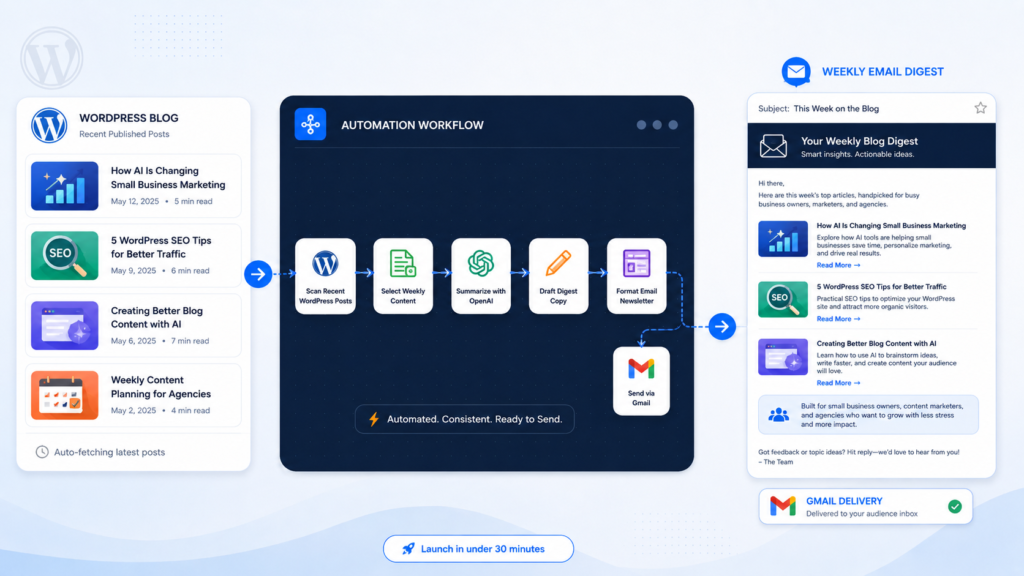
The workflow runs every Monday morning and fully automates your newsletter pipeline: it fetches your latest blog posts, uses GPT-4o to write professional summaries, renders everything into a responsive branded HTML email, then delivers it to every subscriber on your list.
How it works
A Schedule Trigger fires once a week (Monday at 10 AM by default) to kick off the pipeline.
Fetch WP Posts calls the WordPress REST API to retrieve posts published in the last 7 days, requesting up to 20 results with embedded featured media in a single request — no separate media lookups needed.
Process Posts is a Code node that normalizes the raw WordPress API response into clean article objects. It extracts titles, excerpts, URLs, featured image URLs, categories, and publish dates; strips HTML tags and decodes entities; de-duplicates by URL; and returns the top 12 articles sorted newest-first.
AI — Generate Summaries is a LangChain AI Agent backed by GPT-4o. It receives the structured article list and returns a JSON payload containing a 3–5 sentence professional summary for each article plus a short weekly overview paragraph. Image and article URLs are passed through unchanged — the prompt explicitly instructs the model not to modify them.
Format HTML Email renders the AI output into a fully responsive, table-based HTML email. The layout includes a branded header with logo, a weekly overview callout block, individual article cards with featured images, a CTA button, and a footer with unsubscribe link. All brand variables (site name, logo URL, colors, CTA link) are defined as named constants at the top of the Code node for easy customization.
Fetch Subscribers retrieves your mailing list from a custom WordPress REST endpoint using HTTP Basic Auth. This node can be swapped for any other list source — Google Sheets, Airtable, a CRM — with no changes needed downstream.
Check Valid Email filters out any subscriber records that are missing an email address before delivery. Records without a valid email exit silently on the FALSE branch.
Send Newsletter loops through each valid subscriber and delivers the HTML email via Gmail, with the newsletter date dynamically inserted in the subject line.
How to set up
- In Fetch WP Posts, replace
YOUR-WORDPRESS-SITE.comwith your WordPress domain. - In LLM — GPT-4o, select your OpenAI API credential.
- In Format HTML Email, update the constants at the top of the Code node:
SITE_NAME,SITE_URL,LOGO_URL,CTA_URL, andCTA_TEXT. - In Fetch Subscribers, update the endpoint URL and select your WordPress Basic Auth credential. Swap the node entirely if your subscriber list lives elsewhere.
- In Send Newsletter, select your Gmail OAuth2 credential and update the
senderNameoption. - Optionally adjust the send day and time in Weekly Schedule.
Requirements
- WordPress site with the default REST API enabled (no plugin required for posts)
- Custom WordPress endpoint or alternative source for your subscriber list
- OpenAI API key
- Gmail account with OAuth2 configured in n8n
- Self-hosted n8n — this workflow uses
@n8n/n8n-nodes-langchain(AI Agent + OpenAI Chat Model), which requires a self-hosted instance
How to customize the workflow
- Post window — Change
days: 7in theafterquery parameter of Fetch WP Posts to cover a longer or shorter period. - Article count — Update
articles.slice(0, 12)in Process Posts and the matching slice in the AI prompt to show more or fewer articles per issue. - AI model — Swap GPT-4o for GPT-4o-mini or GPT-4.1 in the LLM — GPT-4o sub-node to adjust quality vs. cost.
- Brand styling — All colors, fonts, logo, and layout are controlled inside the Format HTML Email Code node. The HTML uses table-based layout for broad email client compatibility including Outlook.
- Subscriber source — Replace Fetch Subscribers with a Google Sheets, Airtable, HubSpot, or any other n8n-supported node. Map the email field and the rest of the workflow requires no changes.
- Send frequency — Change the Schedule Trigger to bi-weekly, monthly, or any custom cron expression.
- Email service — Replace the Gmail node with Outlook, SendGrid, Mailgun, or any SMTP-compatible service supported by n8n.
--- Support: support@legalgpts.com | Automated Intelligent Solutions
What you get
- The complete n8n workflow (
.json) — import-ready, with a full setup guide in the workflow's sticky notes - Written documentation (
DESCRIPTION.md) - Extra:
WordPress-Plugin.zip - README with import instructions and license
Delivered as a ZIP (12 KB) · SHA-256 c1a083161ee32c1f…
Requirements
- A working n8n instance (self-hosted only — see below)
- Credentials for the services the workflow connects to (listed in the setup sticky note inside the workflow)
How delivery works
Checkout is handled securely by Stripe — we never see your card details. The moment your payment completes, your download is available on the confirmation page, and a backup link is emailed to you. Links stay valid for 72 hours and up to 5 downloads; if yours expires, we'll re-issue it free — see support below.
Support
Every template includes email support for installation and setup questions: support@legalgpts.com. We typically reply within one business day.
Need this workflow customized for your business, or want it installed and configured for you? That's what we do — ask about our implementation services.
Get Send a WordPress Digest using OpenAI
One-time purchase · instant download · free link re-issue
Buy Now — $5.00