
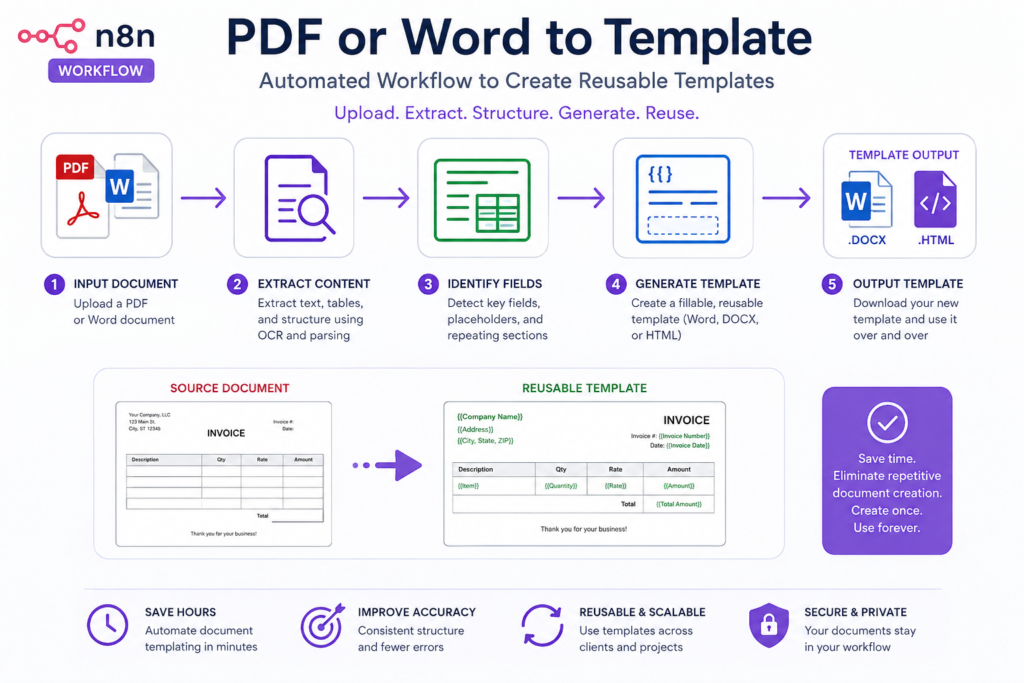
Save time and boost productivity by automating your daily tasks with n8n. This template simplifies complex workflows so you can focus on growing your business without technical headaches.
Kickstart Your Projects with Effortless Template Creation
Streamline your workflow by generating consistent, professional templates in minutes — perfect for repeated processes or new project launches.
What It Does
-
Automated Template Generation:
Quickly produce perfectly structured templates without manual copying. -
Customizable Output:
Easily tailor each template to your unique project requirements. -
Consistent Results:
Maintain professional standards across all your documents, every time.
What’s Included
- Sanitized workflow JSON
- PDF user guide
- Starter asset files
Requirements
- n8n (desktop or server installation)
- Access rights to n8n workflow import
Setup Difficulty: Easy — import the workflow and follow the included guide.
Ready to automate your template creation?
Download now and experience fast, reliable results for all your projects. Have questions?
Contact support.
© AI Solutions, Inc.
What you get
- The complete n8n workflow (
.json) — import-ready, with a full setup guide in the workflow's sticky notes - Written documentation (
DESCRIPTION.md) - Extra:
template_creator_form-1.html - Extra:
template_creator_info-1.html - README with import instructions and license
Delivered as a ZIP (21 KB) · SHA-256 480282b623239b2c…
Also listed in the n8n community library.
Requirements
- A working n8n instance (self-hosted only — see below)
- Credentials for the services the workflow connects to (listed in the setup sticky note inside the workflow)
How delivery works
Checkout is handled securely by Stripe — we never see your card details. The moment your payment completes, your download is available on the confirmation page, and a backup link is emailed to you. Links stay valid for 72 hours and up to 5 downloads; if yours expires, we'll re-issue it free — see support below.
Support
Every workflow includes email support for installation and setup questions: support@ais.email. We typically reply within one business day.
Lost or expired download link? Get a fresh one here — no need to email us.
Need this workflow customized for your business, or want it installed and configured for you? That's what we do — ask about our implementation services.