
Imagine a 14-person estate-planning firm in Phoenix that launches a polished “Book a Consultation” page. A visitor enters a name, email address, phone number and a short description of a family situation. The firm assumes that information goes only to its intake team. Yet a marketing tag added months earlier may be observing form activity in the background. The Federal Trade Commission notes that tracking pixels can be hidden from sight and may collect information about page interactions, including data a visitor types into a form. That gap between what customers expect and what a website actually does is where trust starts to erode.
- What tracking detection services actually reveal
- Why configuration creates the real privacy risk
- How privacy visibility builds customer trust
- Using automation and Microsoft 365 to keep control
- A practical 30-day starting plan
- Frequently asked questions
- Conclusion
What tracking detection services actually reveal
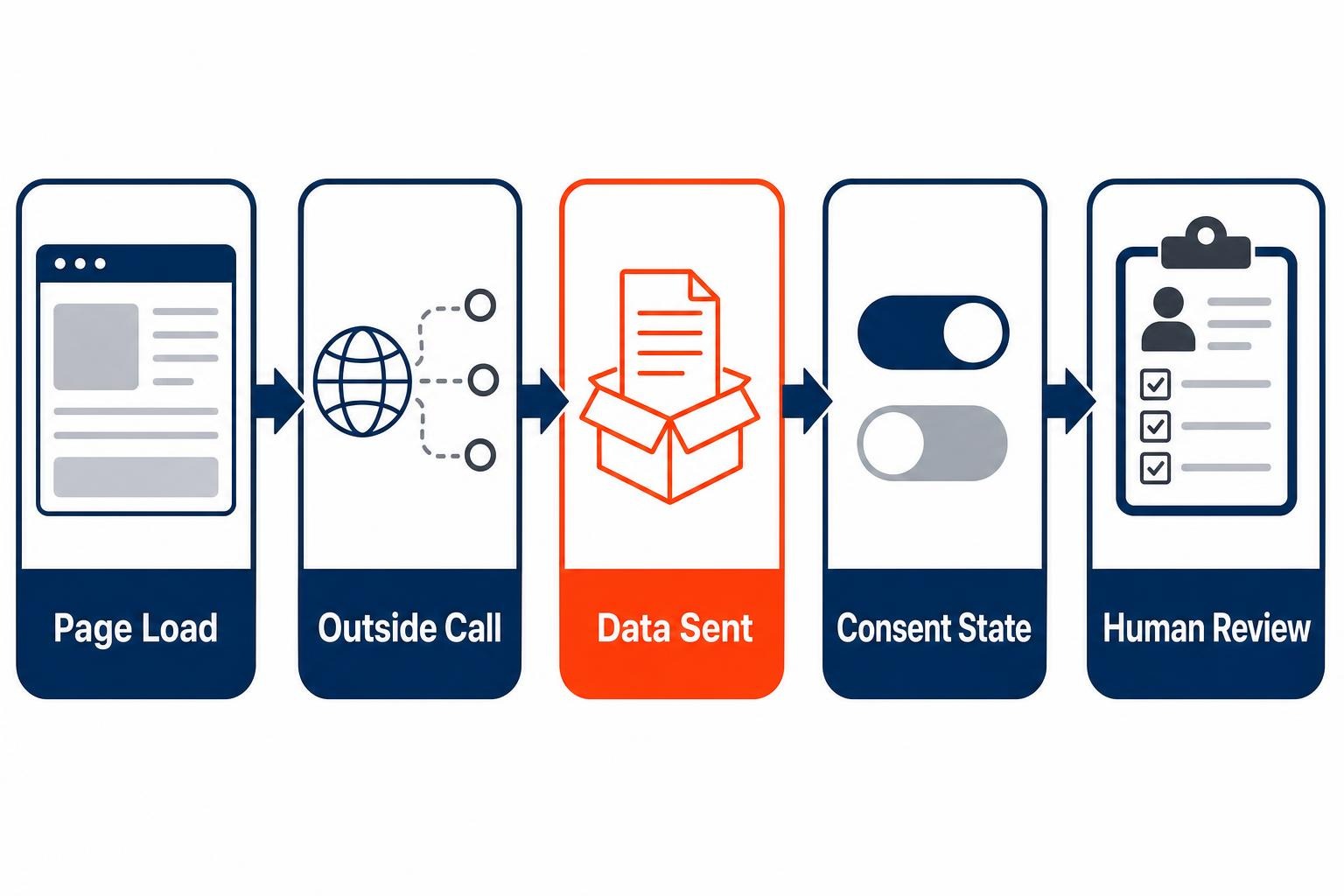
Small businesses often treat website tracking as a marketing setting. That is too narrow. Tracking detection services examine what happens when a real browser loads your pages: which scripts appear, which outside domains receive requests, what cookies or other identifiers are placed, and whether behavior changes after a visitor accepts or declines tracking.
This matters because one small piece of third-party code can call in other code. OWASP explains that a tag manager can return multiple JavaScript files from multiple vendors, and that those files can change what page data they read and send. Third-party JavaScript therefore deserves operational oversight, not a one-time installation review. The same principle applies whether the tag supports analytics, appointment conversion measurement, chat, video, maps or remarketing.
What a useful scan should answer
- Which outside services receive a request from each important page?
- Does a form page behave differently from a generic blog page?
- Are non-essential tags held back until the visitor makes a choice?
- Did a new plug-in, landing page or agency change introduce a new tracker?
- Who inside your firm owns the business reason for each tracker?
A scan is evidence, not a legal conclusion. It can show that a browser sent information to an outside destination. It cannot, by itself, tell you what the recipient retained, whether a contract covers the arrangement, or whether a particular law applies to your firm. That distinction is healthy. Detection gives you a factual starting point for a better conversation with your marketing lead, web developer and counsel.
Why configuration creates the real privacy risk
The important question is rarely, “Do we use analytics?” Nearly every small firm does. The sharper question is, “What data can this specific configuration observe on this page?” A basic traffic count and a form-data collection setting may sit inside the same vendor account, yet create very different customer expectations and risks.
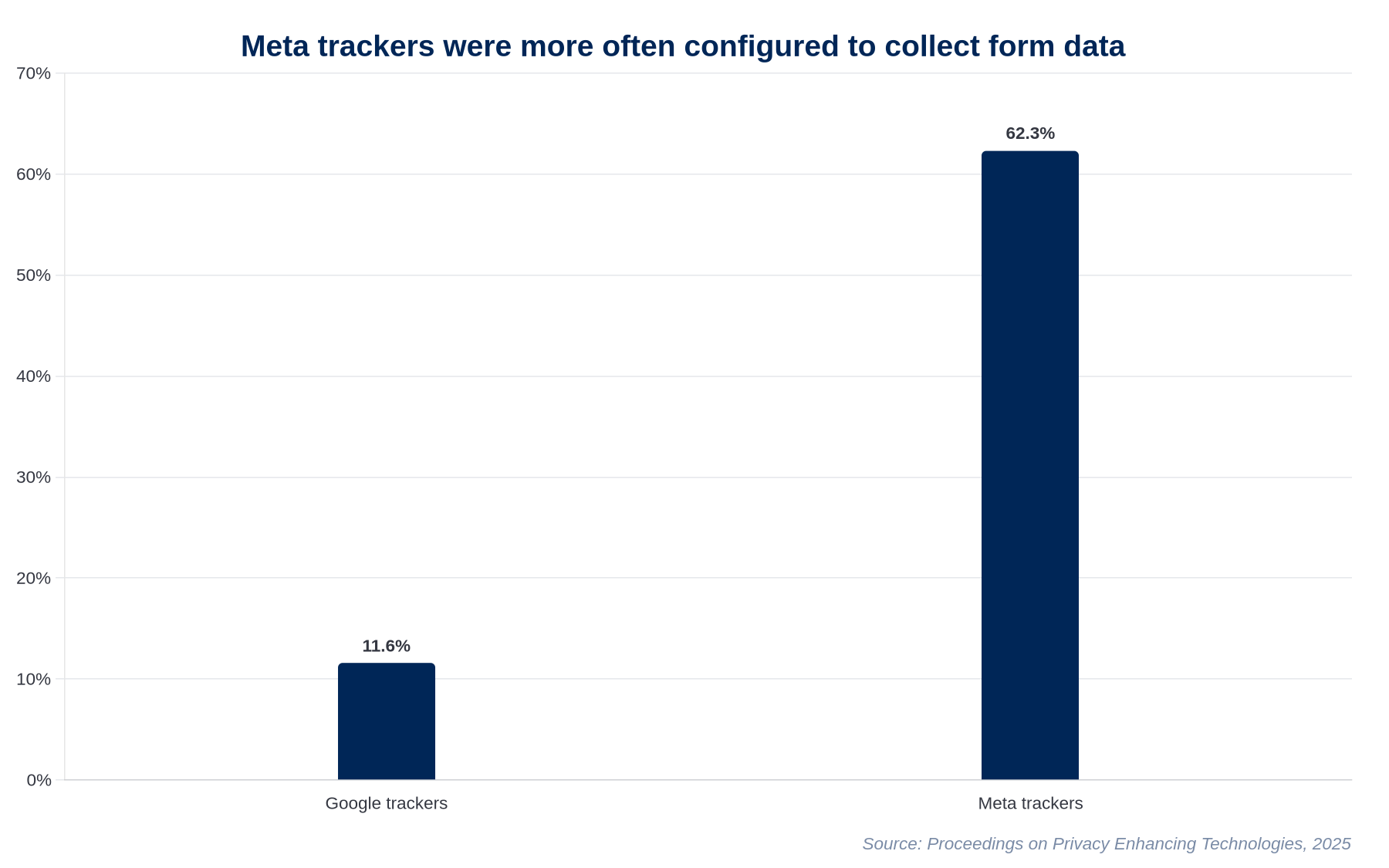
That is why tracking detection services are timely. A 2025 academic study of 40,150 websites found Google trackers on 72.6% of sites and Meta trackers on 28.2%. However, the researchers found that Meta trackers were configured to collect form data far more often than Google trackers, 62.3% versus 11.6%. The study’s point is not that every tracker is improper. It is that the setup choices made by website administrators can materially change what gets collected.
Consider a hypothetical six-person therapy practice that adds an online scheduling widget and keeps its existing advertising tags active on every page. A detection scan identifies outside requests on pages describing anxiety treatment and on the scheduling page. The practice does not need a sprawling technology project. It can first separate public education pages from appointment and intake flows, then ask its web vendor to limit tags on the latter. The change is practical: marketing can still measure broad campaign performance while the most sensitive visitor journeys receive tighter handling.
Professional services should take the same view. An immigration firm may have pages about visas, family reunification and removal proceedings. A financial adviser may invite visitors to request help with retirement planning or debt. The words a person enters, the pages they view and the steps they take can carry more context than a conventional pageview report suggests.
How privacy visibility builds customer trust
Privacy is often framed as a compliance burden. For a small firm, it is better understood as a promise-management problem. Your website makes an implicit promise when it asks a prospective client to tell you something personal: this information is being collected for a reason, by people who will handle it responsibly.
Tracking detection lets you test whether your systems keep that promise. It turns vague language in a privacy notice into observable questions: Did the stated consent choice take effect? Did the tracker fire before consent? Did a new landing page bypass the normal controls? That is far more useful than copying a generic policy template and hoping the website behaves accordingly.
Regulators are also signaling that firms must test what their privacy controls actually do. On March 5, 2026, California’s privacy agency required Ford to pay a $375,703 fine, change its opt-out process and audit website tracking technologies after finding unnecessary friction in the process. The enforcement action specifically required an audit of tracking technologies and compliance with opt-out preference signals. Small businesses may operate at a different scale, but the operating lesson applies: a privacy choice that exists only on paper is not a control.
Take a hypothetical 18-person accounting firm that runs quarterly tax-season landing pages. Its marketing agency adds a new conversion tag each January. Instead of waiting for an annual website redesign to spot the change, the firm scans its public pages before each campaign goes live. One scan flags an unfamiliar destination on a “Send documents securely” page. The owner pauses the tag, confirms it was not needed for campaign reporting, and removes it. Customers never see the work, which is precisely the point. Trust is often built through quiet restraint.
For firms serving California residents, European clients or sensitive sectors, the legal details need individual review. The UK’s Information Commissioner’s Office, for example, treats cookies, tracking pixels, scripts, tags and fingerprinting as part of its online-tracking guidance for organizations. The broader direction is clear: organizations are expected to understand the technologies they place in front of visitors.
Using automation and Microsoft 365 to keep control
A scan that lives in someone’s inbox is not a privacy program. Small firms need a lightweight operating rhythm that catches change without turning the operations manager into a full-time privacy analyst. This is where automation and Microsoft 365 can help.
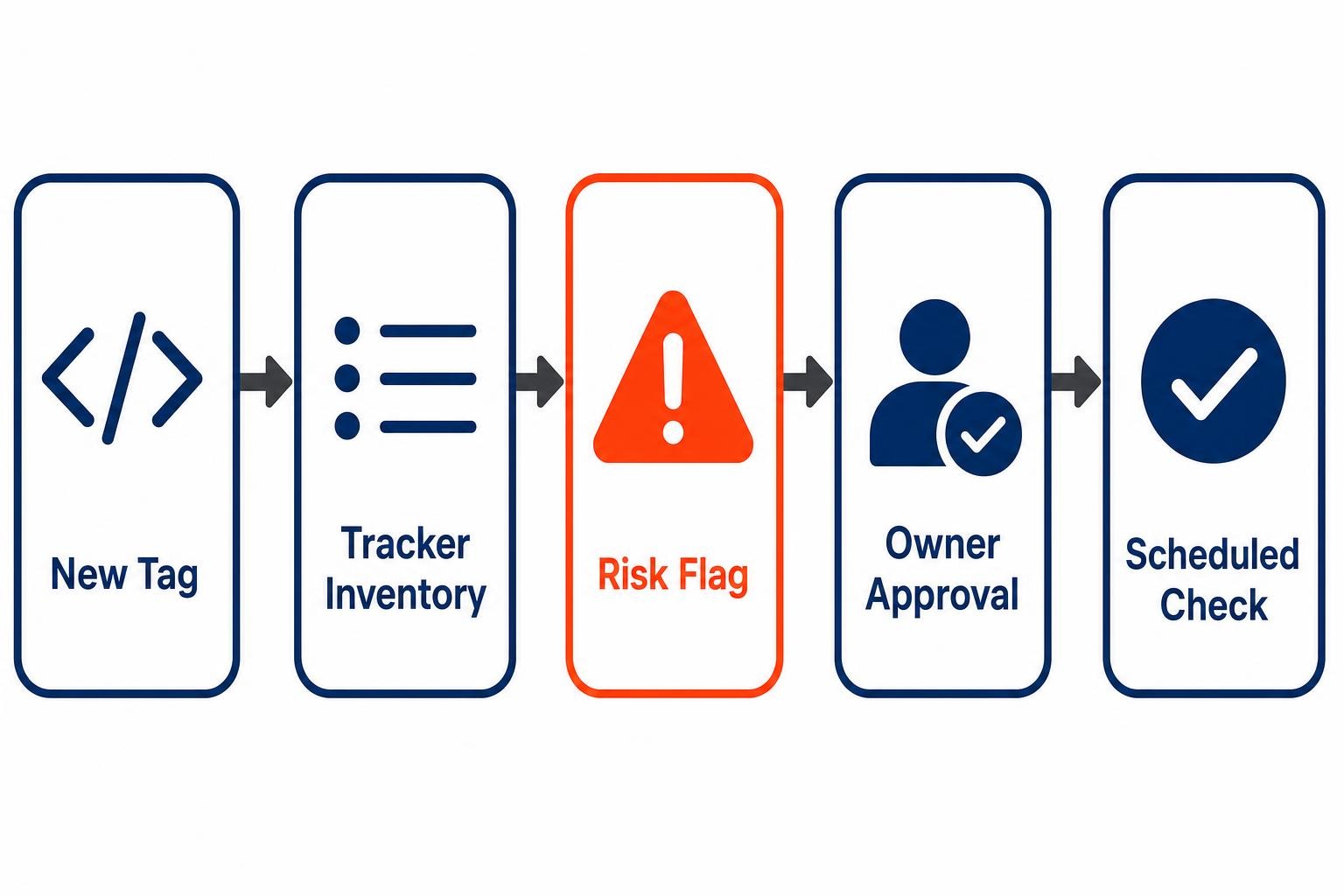
Start with a tracker inventory in Microsoft Lists or SharePoint. Each record should include the tracker or outside domain, the pages where it appears, its purpose, the business owner, the vendor, the consent condition, the date last reviewed and the decision: keep, limit or remove. NIST’s Privacy Framework encourages organizations to identify and manage privacy risk, including across the interconnected service-provider relationships involved in processing data. An inventory gives that risk conversation a shared, workable record.
Then automate the handoffs, not the judgment. When a periodic scan identifies a new tracker, an automation platform can create an item in the inventory, attach the scan result, notify the marketing owner and request approval from the operations lead. Microsoft documents how a Microsoft List item can trigger an approval request and send the result back to the person who created it. That pattern is well suited to tracker review.
Human review should remain with the people who understand the customer journey. An intake manager can explain why a page asks for a phone number. A marketing lead can explain whether a conversion event is truly needed. A business owner can decide whether the insight gained is worth the extra data exposure. Automation should make those decisions visible and timely, not pretend to make them for you.
This approach pairs naturally with the operational discipline described in 7 Benefits of Process Automation for Small Business Owners. It also gives firms a practical way to apply the vendor questions in the AI Glossary and Checklist for Small Business Vendors: who receives data, what controls exist, and who is accountable when settings change?
A practical 30-day starting plan
- Week one: map the high-trust pages. List every page where a visitor submits an inquiry, uploads a document, books an appointment, starts a payment or discusses a sensitive matter. Do not begin with the entire website. Begin where customer expectations are highest.
- Week two: run scans in more than one state. Test a visitor who has not made a consent choice, one who accepts optional tracking and one who declines it. Capture the observed third-party destinations and compare them with your current privacy notice.
- Week three: assign owners and remove obvious excess. Every tracker needs a stated purpose and an internal owner. “The agency installed it” is not a business reason. Remove duplicate tags, retired campaign tags and anything nobody can explain.
- Week four: build the recurring check. Schedule a monthly scan for high-trust pages and a review before major campaigns, website launches or plug-in changes. Record exceptions and decisions in one accessible place.
Do not confuse this with a conventional cybersecurity scan. You need both. Cybersecurity work asks whether an attacker can exploit your systems. Privacy tracking detection asks what your own site sends outward during ordinary customer interactions. As AI-Driven Cyberattacks Are Surging argues from the security side, small firms benefit when ownership and repeatable checks replace informal assumptions.
For a healthcare provider or another regulated entity, escalate suspicious findings promptly. HHS says tracking technologies may include cookies, pixels, session replay and fingerprinting, and that regulated entities must avoid impermissible disclosures of protected health information to tracking vendors. The guidance also makes clear that a third party’s role does not remove the website owner’s responsibility.
Frequently asked questions
What is a website tracking detection service?
A website tracking detection service tests pages from a visitor’s perspective and reports observed scripts, cookies, outside network requests and tracker behavior. It can help you identify technology that may not be obvious in your website editor or marketing dashboard. It does not replace legal advice, vendor due diligence or a review of your privacy notice.
Can a small business use website analytics without harming customer privacy?
Yes, but the firm should define the purpose of each measurement, limit data collection to what supports that purpose and review sensitive pages separately. Broad traffic measurement may be appropriate while appointment, intake, payment and document-upload pages need tighter controls. The key is to verify actual website behavior rather than rely on default settings.
How often should a small business scan its website for trackers?
Scan high-trust pages monthly and before major changes such as a new campaign, form, scheduling tool, chat widget, plug-in or website redesign. Also run a scan when an agency or vendor changes tag-manager settings. The right frequency depends on how often your site changes, not on an arbitrary annual compliance calendar.
Can Microsoft 365 help manage website privacy reviews?
Microsoft 365 can support the operating process around privacy reviews. Use a shared list to inventory trackers and owners, store scan results in SharePoint, and send automated approval requests when a new tracker appears. The technology reduces missed handoffs, while people still decide whether collecting and sharing the data is appropriate for customers.
Conclusion
The Phoenix estate-planning firm does not need to abandon marketing measurement or become a privacy engineering shop. It needs to know what happens after a prospective client clicks “Submit,” then make deliberate choices about what should happen next. New tracking detection services give small firms that visibility. Pair regular scans with a tracker inventory, accountable owners and a simple approval process, and privacy becomes part of normal operations rather than a crisis project. Customers may never see the work. They will feel the difference when your firm handles their information with the care your brand promises.
This article is general information for business owners, not legal, tax or financial advice. Rules vary by state and change often; confirm current requirements with a licensed professional before acting.
Ready to explore how you can streamline your processes? Reach out to Automated Intelligent Solutions today for expert guidance and tailored strategies.