
A five-person home-services company owner manages technician dispatches, customer estimates, school pickup and elder-care appointments from the same phone. When a last-minute family obligation appears, the problem is not simply finding an open hour. It is making sure the dispatcher sees a staffing conflict, the customer receives a realistic appointment option and family members know the owner is unavailable, without any of them seeing private client or household details. That is where Linkdaze’s smart calendar can earn its place: as a boundary layer between personal commitments, business operations and public availability.
- The problem is overlapping responsibilities
- Build three calendar lanes
- Use Linkdaze as a planning layer
- Give the firm its own operating calendar
- Automate calendar rules, not personal judgment
- Frequently asked questions
The problem is overlapping responsibilities, not a lack of calendars
Small business owners rarely suffer from a shortage of scheduling tools. They suffer from one overloaded view of time. A client visit, a technician’s absence, a school concert and a medical appointment all compete for the same afternoon, yet each carries a different audience and privacy expectation.
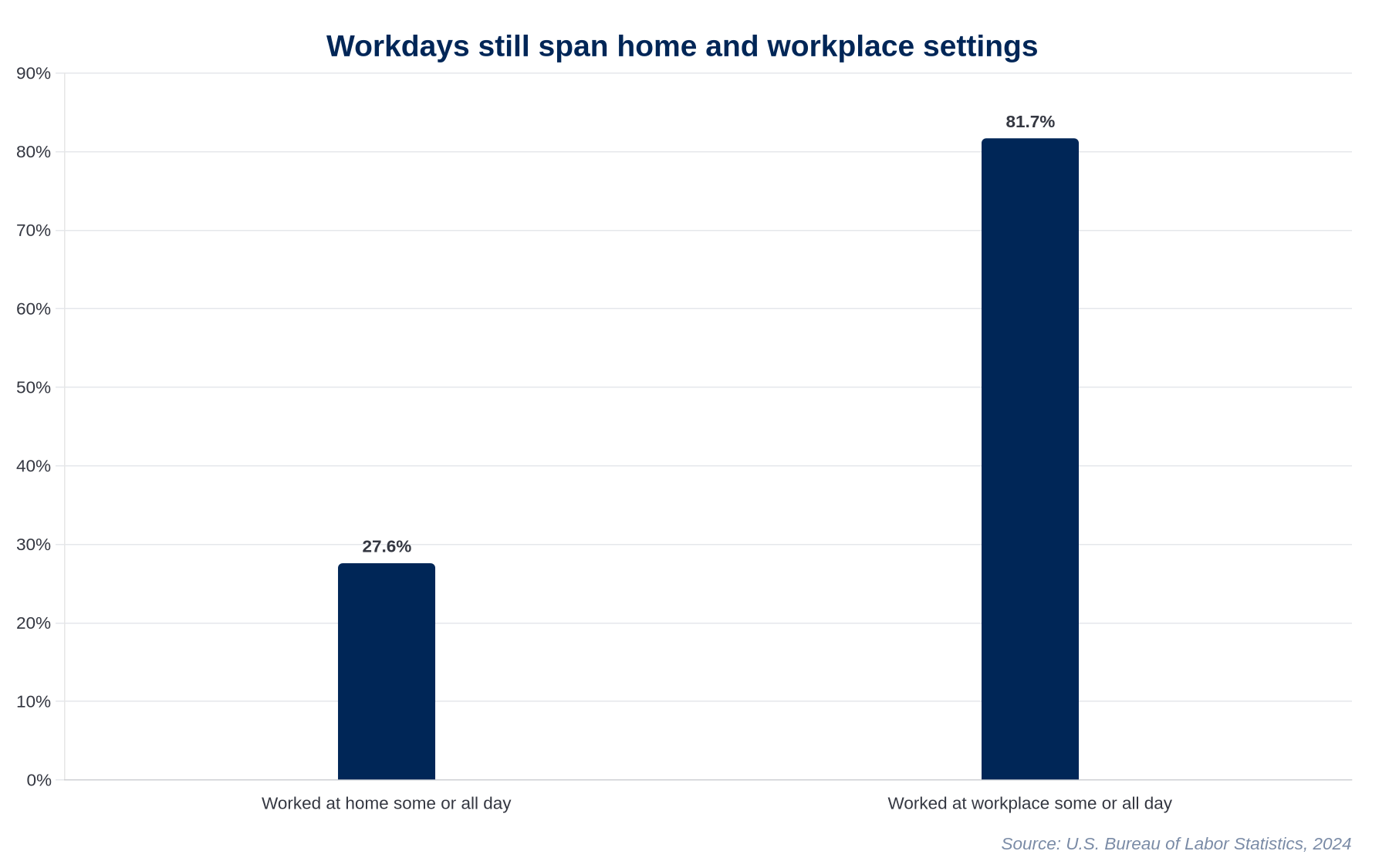
That tension is increasingly normal. The U.S. Bureau of Labor Statistics reported that 27.6% of employed people worked at home for some or all of the day in 2023, while 81.7% worked at their workplace for some or all of the day. The categories can overlap, which is the point: many working days now involve movement between home and workplace obligations. Among people whose work can be done remotely, 46% say they work from home all or most of the time, according to the Pew Research Center.
The common response is to put everything on the owner’s calendar and share it broadly. That choice feels efficient until a staff member sees a family matter, a client invitation exposes an internal job name or a dispatcher cannot tell whether a blocked hour means an estimate, an urgent repair or school pickup.
A better approach treats time as a set of permissions. The objective is not a single perfect calendar. It is a reliable answer to a simpler question: who needs to know that you are unavailable, and how much detail do they need?
Build three calendar lanes, with different audiences
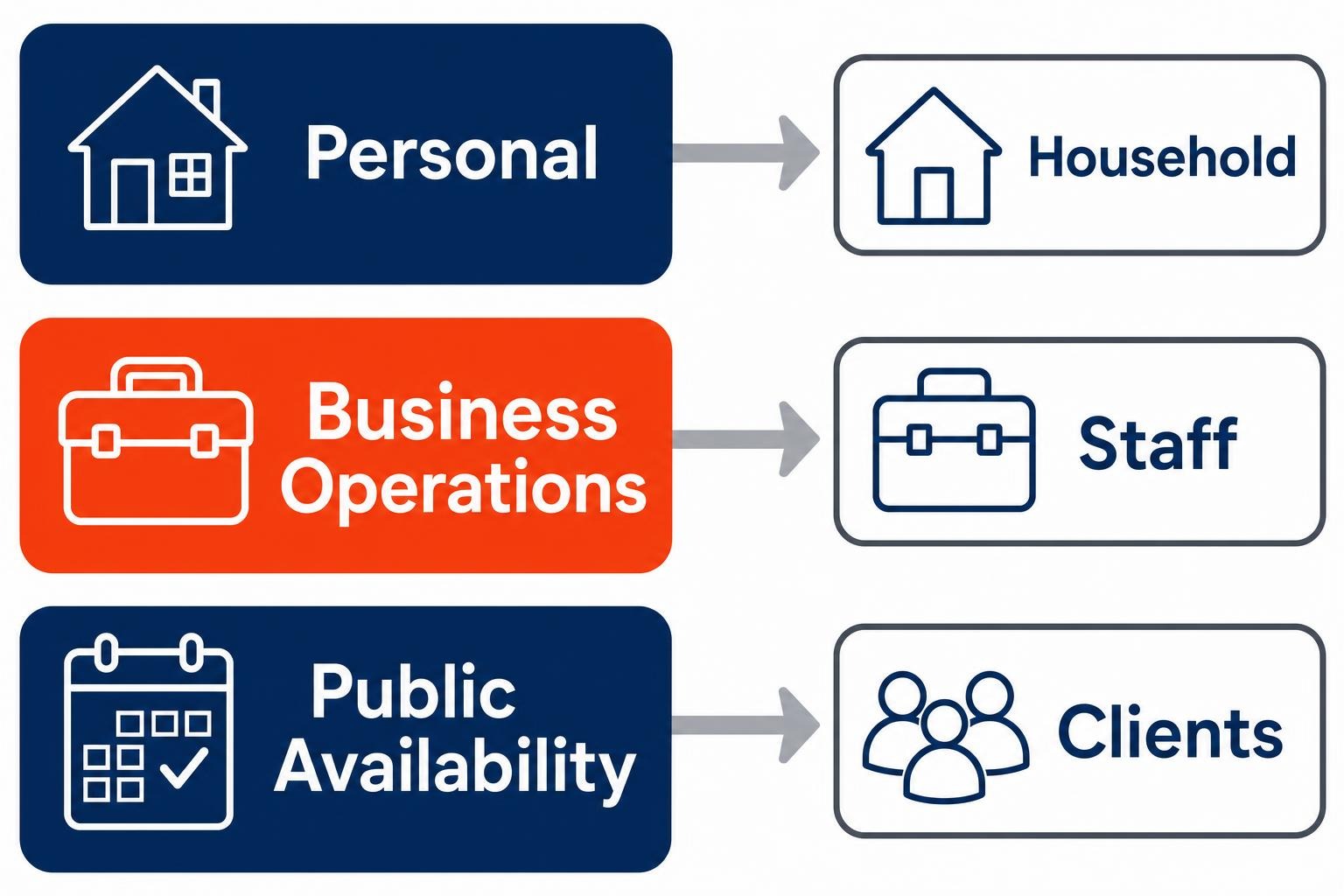
For most owner-led firms, three lanes are enough. They keep personal commitments visible where they matter while preventing a private schedule from becoming accidental company infrastructure.
1. Personal commitments
This lane holds household appointments, caregiving obligations, school events and personal recovery time. Family members may need the details. Colleagues generally do not. Its business purpose is to establish when the owner cannot reasonably accept work, not to broadcast the reason.
2. Business operations
This lane belongs to the company. It covers dispatch coverage, estimates, project milestones, vacation time and internal meetings. Microsoft points out that a team calendar can keep a team aligned on meetings, milestones and vacation time. That is a useful definition of what belongs here: events that require the firm to act together.
3. Public availability
This is the client-facing lane. It should answer whether a meeting can be booked, without revealing why another time is blocked. In Outlook, users can create a separate calendar and set viewing or editing permissions when sharing it, as Microsoft describes on its Outlook calendar page. That separation matters more than forcing every client, supplier and staff member into one shared view.
Microsoft 365 also lets users share calendars with people inside or outside their organization through Outlook on the web, as explained in Microsoft’s calendar-sharing guide. External sharing should be deliberate. Administrators control it in the Microsoft 365 admin center, and Microsoft documents options to expose free/busy information, subject and location, or full appointment details in its guidance on sharing calendars with external users. For most client relationships, free/busy is the sensible starting point.
Use Linkdaze to protect commitments before they become conflicts
The strongest case for Linkdaze is not that it should replace the firm’s business calendar. It should sit above the competing demands on the owner’s time, helping that owner recognize personal and professional constraints before a booking, dispatch decision or meeting invitation creates a collision.
Think of it as the private planning layer. The owner can assess household obligations alongside work demands, then expose only suitable availability through the public or operational calendar. A family event may block an afternoon without telling a customer why. A major job may signal that the owner cannot take estimates that morning without placing client addresses in a household view.

Consider the five-person home-services firm from the opening. On Tuesday morning, the owner learns of an elder-care appointment at 2 p.m. The old method is a sequence of calls: move the estimate, tell the dispatcher something vague and hope a customer does not arrive during the gap. With separate lanes, the owner marks the personal block in the planning view, confirms that the business calendar still has a technician assigned to the afternoon route and shows customers only that the owner is unavailable. What changes is not the appointment itself. The firm gains a clean operational response without turning a private obligation into office gossip.
That distinction matters for professional service firms too. Take a hypothetical three-attorney practice whose managing partner handles client consultations while coordinating a child’s recurring therapy appointment. The household schedule blocks the partner’s availability. The firm’s shared calendar shows the intake team that consultations cannot be placed in that window. Prospective clients see alternate times, not a family detail. The intake process becomes more predictable because the team works from availability, not explanations.
Do not treat every event as equally shareable. A smart calendar is useful when it helps you apply judgment consistently. It is less useful when it becomes another place where staff must hunt for the real answer.
Give the firm its own operating calendar
Owner availability and company capacity are related, but they are not the same thing. A company that depends on one person’s private calendar will eventually lose context when that person is sick, traveling or simply unavailable. Dispatches, project dates and leave coverage need a calendar the business can maintain.
Microsoft Learn states that a shared mailbox can provide a common calendar that members can access and edit, according to its documentation on sharing calendars and contacts. For a small firm, that can be a practical home for a service calendar, an intake schedule or a shared administrative schedule. Microsoft also notes that group calendars can be configured to share members’ schedules, as described in its guide to using a group calendar.
The choice should follow the work, not the product feature. A dispatch calendar needs assigned coverage and clear ownership. A project calendar needs milestones and decision dates. An owner’s Linkdaze planning layer needs privacy and fast recognition of conflicts. Combining those functions makes every calendar harder to trust.
There is a useful operating rule: if an event must still be visible when the owner is away, it belongs on a business-owned calendar. If it explains why the owner is unavailable but requires no action from colleagues, it should remain private and appear elsewhere only as a block.
Automate calendar rules, not personal judgment
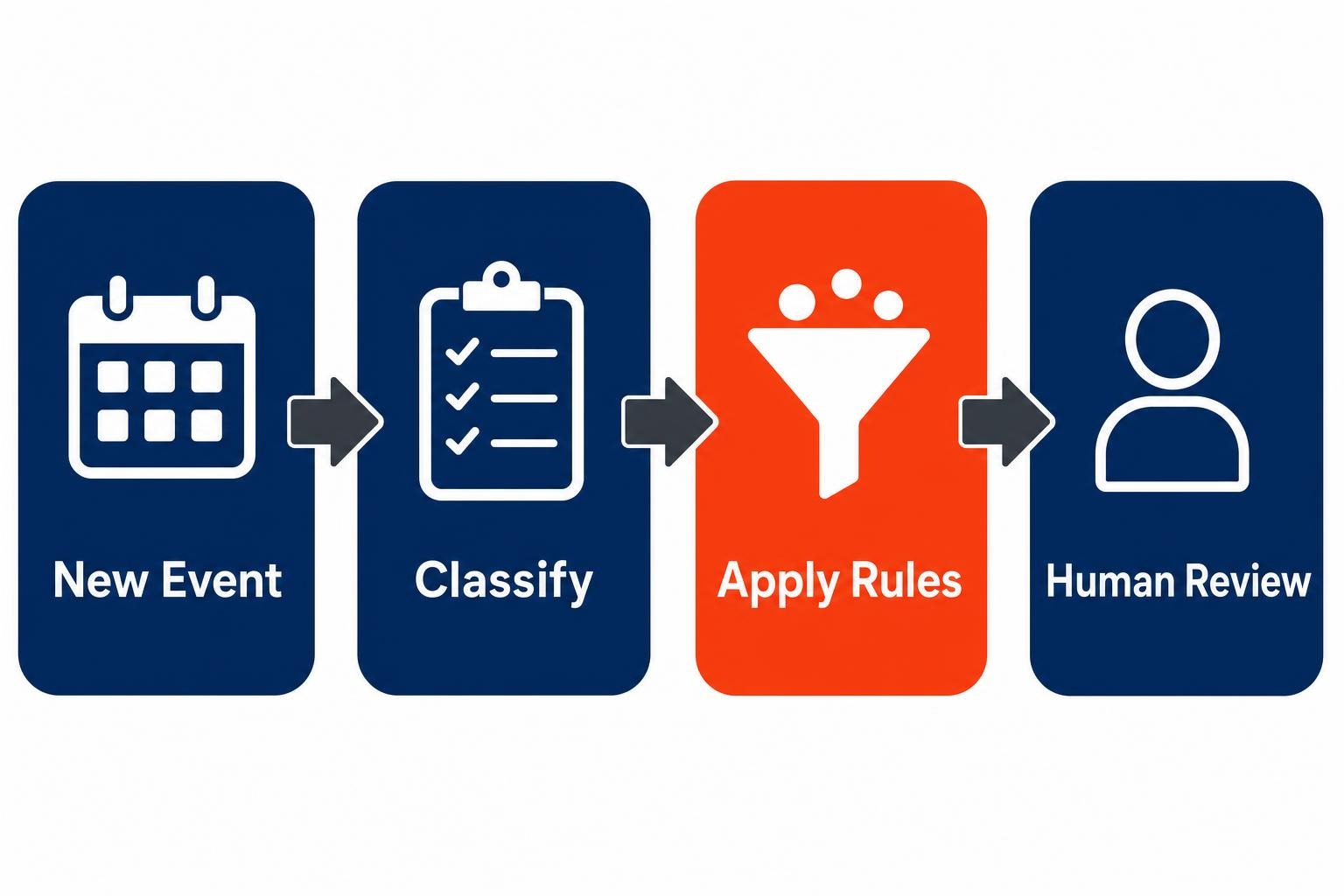
Automation can reduce the repetitive work around calendar governance. It should not decide whether a sensitive family matter is appropriate for a shared company calendar. Start with rules that are predictable: categorize events, create availability blocks, route an internal notification when coverage is needed and preserve a final human check for exceptions.
Microsoft 365 sharing is already enabled by default for Current Channel and Monthly Enterprise Channel customers beginning with version 2112, and for Semi-Annual Enterprise Channel customers beginning with version 2202, according to Microsoft’s calendar-sharing documentation. That convenience is not governance. Someone must still decide which calendar is authoritative, who can edit it and what outside recipients can see.
AI assistance belongs in the same category. Microsoft says Copilot in Outlook includes Calendar instructions that let users specify how they want meetings handled, detailed in its Copilot calendar instructions guide, and Microsoft’s Outlook team began rolling out new agentic email and calendar experiences on March 9, 2026, according to a post on the Microsoft Tech Community blog. Those features can help carry out a policy. They cannot write a sensible policy for a small firm that has never decided what counts as protected time.
A practical first step is modest. List the recurring event types your firm handles, such as client appointments, dispatch coverage, school events, leave and personal appointments. For each, write one answer to three questions: which lane owns it, who can see it and whether a workflow may act on it automatically. This follows the same discipline behind giving your first AI agent one small job: begin with a bounded task, then improve it after people have used it.
Keep the human review for exceptions, sensitive details and final commitments to clients. Automate the predictable handoffs. That balance avoids a brittle system while giving owners back attention for decisions only they can make.
Frequently asked questions
Can I share my Outlook calendar with family members outside my business?
Microsoft 365 supports calendar sharing with people inside or outside an organization through Outlook on the web. Set external sharing deliberately and use the least detailed view that accomplishes the purpose. For family coordination, a private planning calendar can be preferable to exposing a business calendar containing client or internal operational information.
Should my employees be able to see my personal calendar?
Usually, employees need to know whether you are available, not why you are unavailable. Share a business-facing availability view or place a generic blocked period on the appropriate operational calendar. Keep household commitments and sensitive appointments in a separate personal lane unless a specific colleague needs detail to take action.
What calendar should a small service business use for technician dispatches?
Use a business-owned shared operating calendar for dispatches, coverage and changes that other people must maintain. Do not make an owner’s personal calendar the record of company capacity. A shared mailbox calendar, team calendar or group calendar can provide a common place for the firm to coordinate work.
Can AI schedule meetings without exposing private commitments?
AI can assist with meeting handling when it works from clear instructions and appropriately scoped calendar access. Give it rules about which availability it may use and what it must not disclose. Keep sensitive exceptions, family commitments and final client promises subject to human review before information is shared.
Design the boundaries before adding another calendar
For the home-services owner, the answer is not to make every technician, client and family member a participant in one giant schedule. It is to give each group the right signal. Linkdaze can serve as the owner’s planning layer, while Microsoft 365 provides permission-controlled business calendars and shared operating views. Start by separating personal commitments, company coordination and public availability. Then automate repeatable handoffs with explicit rules. When a family obligation lands at 2 p.m. the business should see a coverage decision, clients should see realistic availability and the household should retain its privacy.
Ready to explore how you can streamline your processes? Reach out to Automated Intelligent Solutions today for expert guidance and tailored strategies.