
A 14-person managed IT services firm receives a steady flow of demo requests, yet its owner finds the real problem after the booking confirmation. Some prospects get a useful briefing; others meet a seller who has not reviewed their needs. After a Teams call, follow-up tasks sit in personal notes, and nobody clearly owns the next step. The firm does not need another scheduling widget. It needs a dependable handoff system that turns a booked demo into accountable sales work. That distinction should shape how small businesses choose demo workflow automation platforms.
- The demo problem is the lost handoff
- Choose platforms by where demo data lives
- Use Microsoft 365 for human-owned handoffs
- Turn the meeting into structured sales work
- Reserve advanced sales agents for repeatable work
- Frequently asked questions
The demo problem is the lost handoff
Most software comparisons begin with booking. That is understandable, but it is the wrong place for a small firm to concentrate its attention. Sales demo management automation is designed to coordinate and track demos without manual follow-up. The word that matters is “track.” A calendar appointment is an event. A sales process needs an owner, context, a decision, and a deadline.
Booking tools can help prevent collisions and send the right alert. Zapier’s published examples connect tools such as Calendly, Chili Piper, Google Calendar, Outlook, and Slack to schedule meetings, prevent conflicts, and notify the appropriate representative. That is useful operational plumbing. Yet a firm can automate every reminder and still lose a qualified prospect if the seller arrives unprepared or the next action disappears after the call.
A demo workflow should be judged by what happens when a person fails to remember, not by how polished the booking page looks.
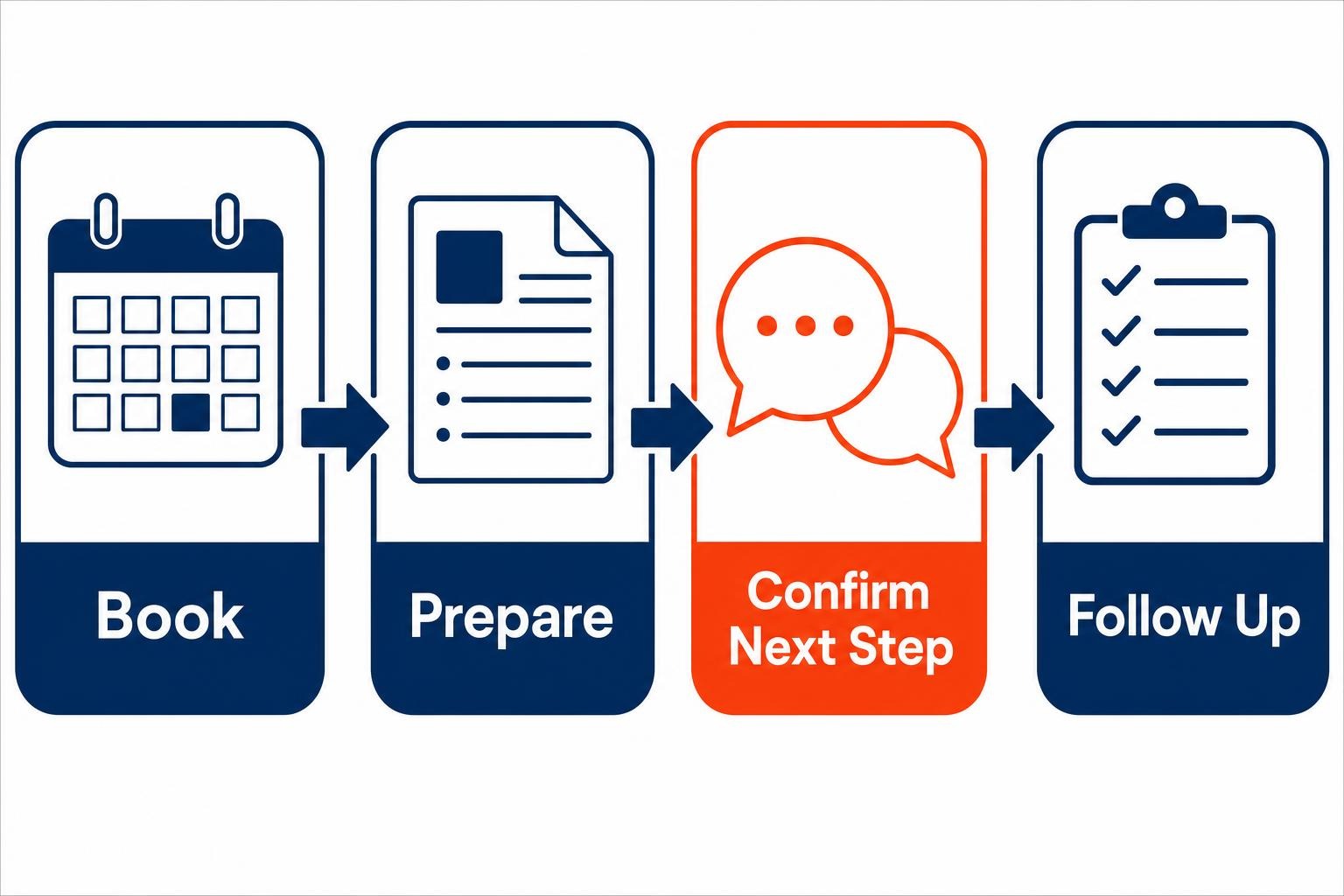
Map your current demo process as four handoffs: booking to assigned seller, assigned seller to prepared seller, meeting to documented outcome, and outcome to owned next step. Then inspect the exceptions. What happens when the assigned seller is out? Where does a prospect’s original request live? Who notices that a proposal promised during a call has not been sent?
Consider a hypothetical version of the managed IT firm above. A prospect books a security assessment demo. The calendar invite exists, but the account manager does not see the website form submission, the technical consultant receives no briefing, and the owner hears about a requested proposal three days later. The fix is not an additional sequence of generic emails. The firm needs one workflow that attaches the intake context to the event, assigns a preparation task, and requires a named person to confirm the post-demo action.
Choose platforms by where demo data lives
The top platforms for automating product demo workflows occupy different jobs. Small businesses often buy overlapping tools because they start with a feature list rather than the location of their customer records, calendars, team conversations, and task management. Start with the system your team already opens every day.
| Platform approach | Best fit | Documented strength for demo workflows | Practical caution |
|---|---|---|---|
| Cross-app automation | Firms with a mixed calendar, scheduling, and messaging stack | Connects demo scheduling examples across calendar, scheduling, and notification tools | Keep the workflow focused on the handoff, rather than creating a chain nobody can audit. |
| Microsoft Power Automate | Microsoft-centered firms that need cloud and desktop process automation | Provides no-code cloud flows for apps, data, and services, plus desktop flows for robotic process automation | Define the owner and exception path before building the flow. |
| Microsoft 365 Copilot Workflows | Teams that coordinate demo work in Outlook, Teams, SharePoint, and Planner | Can create workflows from natural-language descriptions across Microsoft 365 work tools | Use it for internal accountability, not for vague automation experiments. |
| Microsoft sales intelligence | Firms with a connected CRM and a repeatable sales motion | Microsoft 365 Copilot for Sales connects with Dynamics 365 Sales and Salesforce Sales Cloud, with options for other sales solutions | Sales insight is only as useful as the underlying customer data and agreed sales rules. |
For a Microsoft 365 firm, Power Automate is often the practical middle ground when work crosses systems or includes a desktop task. Its product materials also describe guided insights, automation recommendations, and drag-and-drop workflow building. That lowers the barrier to a first workflow, but it does not remove the need to decide what should happen when a prospect reschedules, declines, or goes quiet.
Cross-app tools deserve a place when your scheduling system, calendar, CRM, and team chat live in different products. Microsoft-native options deserve a close look when the sales team already works in Outlook and Teams. That is why Your Business Needs Three Calendar Lanes is relevant to sales operations: availability, delivery work, and prospect meetings need deliberate rules before any automation can route them well.
Use Microsoft 365 for human-owned demo operations
The most useful automation does not pretend the sales team has no judgment to exercise. It reduces the number of moments when a person must remember routine coordination. Microsoft 365 Copilot Workflows can trigger actions on a schedule or when an event occurs, and can collect input through adaptive cards in Teams. That makes it suited to a simple but valuable pattern: automate the request for accountability, not the judgment itself.
Take a hypothetical eight-person HR consultancy. A prospect books a workforce-planning demo. When the event enters the calendar, a workflow creates a preparation checklist, posts a Teams prompt asking the consultant to confirm the prospect’s objective, and flags the record if there is no response before the meeting. After the demo, the salesperson receives a second prompt: “What is the next action, who owns it, and by when?” The workflow can then create the task and notify the owner.
What changed? The consultant still decides whether the prospect needs a proposal, a technical follow-up, or a polite disqualification. The system makes it harder to leave that decision undocumented. That is a sensible first use of AI and automation in a small sales operation.
Keep three items manual: qualification judgment, the substance of a recommendation, and approval of sensitive communications. Automate the assembly of context, reminders, task creation, and overdue checks. Firms making broader changes to their Microsoft environment should also treat workflow design as part of operational readiness, much like the concerns raised in Microsoft 365 Migration Must Work on Monday.
Turn the meeting into structured sales work
A recorded demo is not a sales outcome. The useful output is a documented buying signal, a next step, and material that helps the seller respond well. Microsoft says its AI sales tools can connect to CRM and business tools to summarize customer meetings, draft personalized communications, and generate pitch decks, proposals, and follow-up questions. Used carefully, that capability can reduce the administrative gap between a good conversation and a timely response.

Microsoft’s Sales agent integrates with Outlook and Teams, using CRM data, Microsoft Graph, Microsoft 365 apps, large language models, and relevant web sources. Its documented Teams meeting recap capabilities include highlighting action items, key tasks, conversation KPIs, and sales-related keywords. Treat those outputs as a working brief for the seller, not an automatic verdict on what the buyer meant.
For the hypothetical HR consultancy, the post-demo routine could be short: review the recap, validate the prospect’s stated problem against CRM notes, choose the next action, and send a tailored message after a human review. If the prospect asked for a scope outline, the workflow can prepare the task and deadline. If the call revealed a poor fit, the seller can document that directly. The technology handles collection and prompting; the team owns the commercial call.
This distinction matters because sales assistance covers activities from qualification and engagement through deal progression and administrative automation. Do not start by asking an AI tool to run all of them. Begin with the point where your team is consistently dropping the baton.
Reserve advanced sales agents for repeatable work
Advanced sales agents have a role, but they should come after a firm has stable rules. Microsoft says organizations can customize Sales agent with Copilot Studio to apply their own business data, logic, and actions to sales scenarios. That is promising when your demo process has settled into clear patterns, such as assigning a technical specialist by product line or escalating opportunities that meet defined criteria.
Before building that kind of agent, write down four things: trusted data sources, routing rules, approvals, and escalation paths. If nobody can agree on when a lead is qualified, an agent will merely perform disagreement faster. A narrow first assignment is safer, such as checking whether every completed demo has a next-step owner and prompting the appropriate person when it does not.
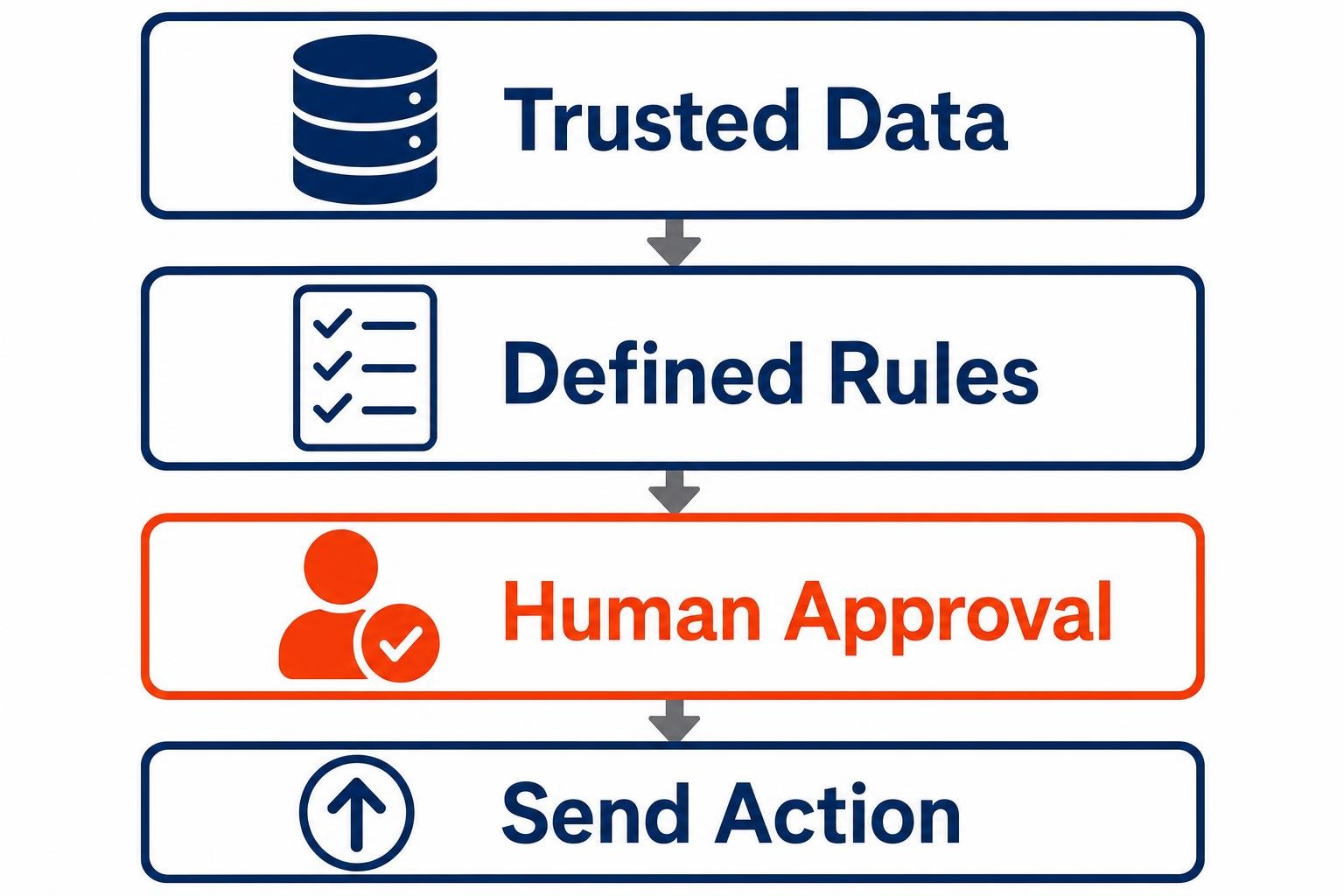
That staged approach aligns with Microsoft’s current Copilot for Sales planning, which emphasizes conversational access to sales data, mobile experiences, governance, and extensibility for planned delivery from April through September 2026. Governance is not a large-company ceremony. For a small firm, it means a practical answer to basic questions: Which record is authoritative? Who can change a workflow? Which messages require review?
Start smaller than you think. Your First AI Agent Should Have One Small Job captures the right operating principle. Make the job observable, correct errors early, then expand only when the underlying process is dependable.
Frequently asked questions
What is demo workflow automation?
Demo workflow automation is a set of connected steps that makes sure a prospect is routed, prepared for, followed up with, and assigned an owner after a product demonstration. For a small firm, the useful test is simple: can the system show who owes the next action and when it is due?
Which demo automation platform is best for a small business?
The best choice depends on where your customer records, calendar, meeting notes, and task work already live. A mixed software stack may favor a cross-app workflow tool. A Microsoft 365-centered firm may gain more from workflows inside its existing work environment. Choose the platform that repairs your most frequent handoff failure first.
Can Microsoft 365 automate demo follow-up?
Yes, a Microsoft 365-centered workflow can support follow-up by prompting for seller input, assigning tasks, tracking deadlines, and collecting meeting context in the tools staff already use. The practical limit is judgment. A person should still confirm the promised next action, review customer-facing content, and decide whether an opportunity deserves further effort.
Should AI send a sales follow-up without review?
For most small firms, review should remain part of early AI-assisted follow-up. AI can help assemble meeting context and draft a response, but a seller should check accuracy, tone, scope, and commitments before sending it. Automatic messages are better reserved for clear administrative confirmations with approved wording and a defined exception path.
Build the handoff system before adding more sales software
The 14-person managed IT services firm does not need to treat every booked demo as a technology failure waiting to happen. It needs a visible chain of responsibility: a prepared seller before the meeting, a validated outcome afterward, and a named owner for the next action. Start by tracing a handful of recent demos and identifying where information or ownership disappeared. Then automate one repeatable handoff around the tools your firm already trusts. The best demo workflow platform is the one that makes valuable prospects harder to forget, while keeping commercial judgment in human hands.
Ready to explore how you can streamline your processes? Reach out to Automated Intelligent Solutions today for expert guidance and tailored strategies.