Automate invoice processing by extracting, classifying, and updating invoice data from emails and PDFs daily with n8n. Save time and reduce errors for small businesses.
Automate Your Invoices. Eliminate Busywork.
Transform invoice processing from a daily chore into a seamless, AI-powered workflow. Extract, organize, and record invoices automatically—so you stay on top of your finances without lifting a finger.
What Does the N8N-Invoice Processor Do?
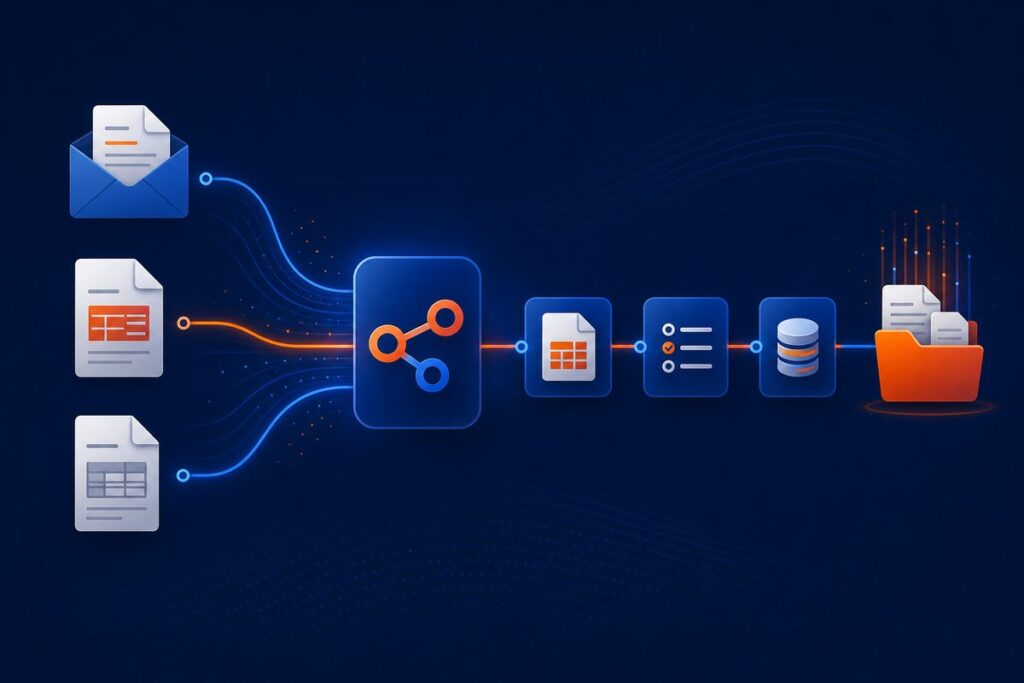
Inbox Invoice Detection
Automatically scans your Outlook inbox for new invoices every morning.
AI-Powered Data Extraction
Uses OpenAI and LangChain to accurately capture invoice details from attachments—no manual typing.
OneDrive File Storage
All invoices are uploaded and organized in OneDrive, with links auto-inserted into your records.
Real-Time Excel Updates
Your master spreadsheet stays current—invoice data and document links updated automatically, every day.
Daily Summary Report
Stay in control with a concise, actionable email digest of all invoices processed.
What’s Included:
- Sanitized workflow JSON — ready to import to your n8n instance
- Step-by-step PDF user guide
- Starter asset files: sample spreadsheets, config templates, test emails
Requirements:
- n8n instance (self-hosted; includes LangChain & community nodes)
- Microsoft 365 account (Outlook, Excel, OneDrive)
- OpenAI account (for AI-powered extraction)
- Configured credentials for Outlook, OneDrive, Excel in n8n
- Basic n8n familiarity (low-code automation)
Typical setup: 30–60 minutes with clear docs
Ready to automate your invoices?
Get started today, or reach out for tailored guidance on streamlining your accounts payable.
support@ais.email
What you get
- The complete n8n workflow (
.json) — import-ready, with a full setup guide in the workflow's sticky notes - Written documentation (
DESCRIPTION.md) - Extra:
Invoice-Processor-receipts.csv - Extra:
Invoice-Processor-invoices.csv - README with import instructions and license
Delivered as a ZIP (17 KB) · SHA-256 4433cb816a336d16…
Requirements
- A working n8n instance (n8n Cloud or self-hosted)
- Credentials for the services the workflow connects to (listed in the setup sticky note inside the workflow)
How delivery works
Checkout is handled securely by Stripe — we never see your card details. The moment your payment completes, your download is available on the confirmation page, and a backup link is emailed to you. Links stay valid for 72 hours and up to 5 downloads; if yours expires, we'll re-issue it free — see support below.
Support
📄 Full User Guide (PDF) — complete installation and configuration details.
Every workflow includes email support for installation and setup questions: support@ais.email. We typically reply within one business day.
Lost or expired download link? Get a fresh one here — no need to email us.
Need this workflow customized for your business, or want it installed and configured for you? That's what we do — ask about our implementation services.