
A 28-person accounting firm is moving email and files into Microsoft 365 before tax season. Its real risk is not losing an old folder. It is whether staff can find client workpapers, receive email, open the correct shared folders, and retain the right permissions on the first business day after cutover. That is the right way to frame small business data migration: as continuity design. A transfer can show as completed while client work, approvals, and communication are still broken. The five steps below put Monday morning’s work ahead of a migration dashboard’s success message.
- 1. Define success as uninterrupted work
- 2. Inventory data, identities, and access paths
- 3. Design Microsoft 365 around ownership
- 4. Rehearse a controlled cutover
- 5. Prove work and recovery
- Frequently asked questions
- Conclusion
1. Define success as uninterrupted business workflows
Most migration plans begin with a technical inventory. Start somewhere more useful: the work people must complete while the move is happening. List the activities that cannot fail, such as receiving new-client email, locating active engagement files, sending invoices for approval, or accessing a shared job folder from the field. Give every workflow an owner, an acceptable interruption window, and a clear recovery point.
This changes the conversation. Instead of asking, “Have we moved 4,000 files?” you ask, “Can the tax manager open the client workpaper folder, confirm who has access, and send a message to the client?” AWS advises small and midsize businesses to use structured migration phases with clear gates rather than one big-bang move. That is sound advice because a gate can be tied to a working business process, not merely a technical completion percentage.
A simple move involving inactive archives may suit a concentrated cutover, while actively used systems often need staged synchronization. Guidance for small businesses similarly distinguishes a big-bang migration for simpler moves from a trickle approach for systems in active use, helping firms control downtime through the method they choose.
Consider a hypothetical 11-person architecture practice replacing a shared file server. A file-count target would tell the firm little about disruption. Its continuity brief instead names four protected workflows: opening current drawing sets, issuing revised PDFs, receiving client email, and approving invoices. The firm moves completed projects first, then pilot-migrates one live project team. What changes is the decision standard: the team advances only after a project manager can complete those four tasks in the new location.
There is a financial reason to be disciplined as well. AWS’s small business checklist calls for an ROI model to support migration funding decisions, but keep the model modest. Use your own inputs for time spent searching, after-hours support, duplicate storage, and likely interruption cost. A polished spreadsheet cannot justify a migration that leaves staff unable to serve clients.
2. Inventory the data, identities, and access paths that support the work
Discovery should be a decision process, not a spreadsheet marathon. For every workflow from Step 1, identify the application, data location, employee or team owner, external sharing route, and dependency. A client workpaper may sit in a shared drive, arrive through email, be copied to a local desktop, and be linked from an accounting application. Missing one path can create a Monday-morning failure even when the main folder arrives intact.
A useful inventory begins with what exists and ends with what deserves to move. AWS recommends auditing applications, data, dependencies, obsolete tools, and data-quality gaps before migration. As part of that review, clean obvious problems. QuickBooks’ small-business migration guidance recommends correcting errors, removing duplicates, and standardizing formats before data is transferred.

Ask four questions of every source
- Who owns it? Name the person or team accountable for a decision about retention and access.
- Who uses it? Record internal users, shared mailboxes, contractors, and clients where relevant.
- What work does it support? Tie the source to a real workflow, not a vague category such as “operations.”
- What happens if it is missing? Define whether the result is inconvenience, delayed billing, missed communication, or a full stop.
Do not migrate clutter simply because it is easier than deciding. Archive stale material where your retention needs permit, flag duplicates and ambiguous owners, and deal with permission sprawl before it reproduces itself. This is also a sensible point to review whether external form submissions expose information more widely than intended. The firm’s guide to whether website forms send data to trackers offers a useful reminder: data paths deserve scrutiny before information is copied into a new environment.
3. Design Microsoft 365 around ownership and permission continuity
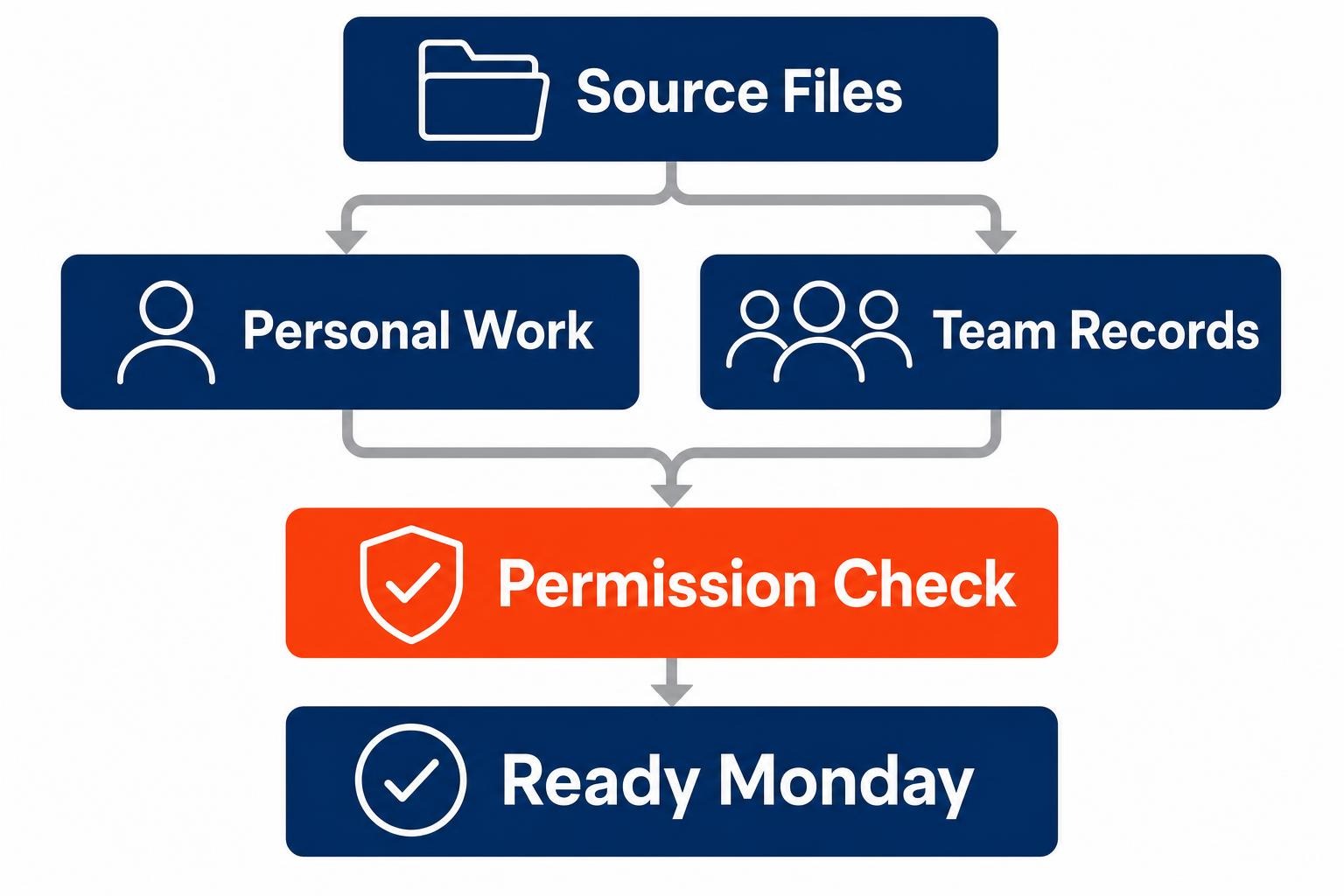
A destination folder structure is not a substitute for ownership. In Microsoft 365, the practical dividing line is straightforward: employee-owned working material belongs in OneDrive, while team-owned records belong in SharePoint. That separation reduces the risk that a departing employee’s personal storage becomes the accidental home for client files, templates, or operating records.
Before content moves, map source accounts to target identities. Microsoft’s migration documentation instructs organizations to understand their scenario, select appropriate tools, and plan source-to-target identity mapping. Then map the folders and access rules behind the workflows, not simply the directory tree. Techzura’s Microsoft 365 checklist likewise recommends placing personal files in OneDrive and shared team data in SharePoint while mapping folders and permissions.
Use automation for evidence, not for final judgment
This is where an automation and AI approach earns its place. An automation platform can collect inventory records, compare source and destination permissions, and send an exception report when a folder has no owner, a user is missing, or a destination count differs from the source. AI can help classify stale material and summarize exceptions for review. It should not decide whether a client file may be retained, deleted, or shared. Those are business decisions that require a responsible staff member.
Start with one narrow workflow, such as a weekly permission comparison for active client folders. This follows the principle behind giving your first AI agent one small job: make the output easy to check before expanding its role. A migration is a poor time to hand an automated system authority it has never earned.
Return to the accounting firm. Its tax workpapers should be team-owned records in SharePoint, with access based on engagement teams rather than on whoever happened to create the source folder years ago. Individual draft notes may remain in OneDrive. By making this distinction before transfer, the firm avoids recreating a familiar but fragile arrangement in a new service.
4. Shrink the cutover into a controlled delta, then rehearse it with real users
A disruptive weekend is often the result of treating the final cutover as the first serious test. Move the bulk of data early where the system and migration method allow it. For Exchange migrations, Techzura recommends pre-syncing mailboxes and calendars so the final window is limited to a smaller delta synchronization and DNS switch. That gives your team a shorter, more intelligible list of work during the period when staff are waiting.

Choose pilot users for how they work, not for how agreeable they are. Include a heavy email user, someone who works from shared folders, an approver, and a person who works remotely. Have them perform specific tasks from the continuity brief. Wisechecker recommends a test-user pilot and clear user communication to reduce disruption. The test should produce a list of failures, confusing changes, and missing permissions, followed by a named owner for each fix.
Take a hypothetical six-person property management office moving its shared records. During the pilot, the bookkeeper can see lease folders but cannot edit a shared invoice template, while the maintenance coordinator can edit the template but cannot locate a vendor photo folder. Both issues are ordinary, and both would be costly during a live Monday. The rehearsal turns them into fixes before cutover rather than support tickets after it.
5. Prove that people can work and that the migration can be reversed
Backups and rollback plans are often mentioned as technical housekeeping. Treat them as decision tools. Before cutover, establish what data is protected, who can authorize a return to the source system, how users will be told, and what condition triggers that decision. AWS calls for smoke tests, user acceptance testing, and a rollback plan before cutover. A separate small-business guide advises backing up important databases, media, settings, and exports before any move begins.
After cutover, run the same workflow tests defined in Step 1. Test the client email address, a shared client folder, a document approval, a calendar invitation, and an external sharing scenario if one is used in normal work. Then reconcile the evidence. Uprite recommends comparing source and destination file counts and investigating every discrepancy rather than treating a mismatch as background noise.
Do not declare victory when the migration tool reports success. Declare it when designated staff have completed the agreed tasks, exceptions have owners, and the team knows whether to continue or reverse. That is a higher standard, and it is the one your employees and clients will notice.
Frequently asked questions
How do I migrate business data without downtime?
You cannot promise zero interruption for every system, but you can reduce it by moving bulk data ahead of cutover, reserving the final window for recent changes, and rehearsing with representative users. Define the few workflows that must work immediately, test them before and after the move, and keep a documented rollback decision path.
Should small businesses use OneDrive or SharePoint for shared files?
Use OneDrive for work that an individual employee owns and manages. Use SharePoint for client records, departmental documents, templates, and files a team must retain regardless of staff changes. The important task is assigning ownership and access deliberately before migration, then testing that people can find and work with shared records.
What should I test after migrating to Microsoft 365?
Test the work that keeps your firm operating: sending and receiving email, opening active shared folders, editing a team document, joining a calendar meeting, and confirming appropriate access for staff and external collaborators. Also compare source and destination file counts, investigate exceptions, and confirm that your rollback plan remains available until acceptance testing is complete.
Build for Monday morning, not for a completion report
Successful small business data migration depends on a simple discipline: define the work that must continue, map the data and access behind it, design ownership in the destination, rehearse the switch, and prove recovery before declaring success. For the 28-person accounting firm, that means tax staff opening the right workpapers, receiving client messages, and working in the proper shared folders when the first business day begins. Start with one continuity brief and one pilot group. The technical move will be clearer because the business outcome is clear.
Ready to explore how you can streamline your processes? Reach out to Automated Intelligent Solutions today for expert guidance and tailored strategies.